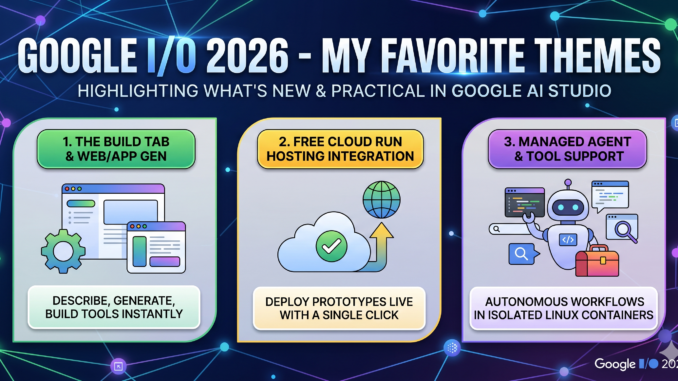
In our post today, I’m excited to explore some of my favorite trends from Google IO 2026. From Android platform evolutions, new tools in Google AI Studio, and trends in agents, the yearly conference from Google IO highlights the themes of transformation triggered by AI innovation of the Gemini platform and the evolution of cloud and data tools to support robust context management. I hope to focus on the practical stuff that developers can enjoy today to create more impact and expand their influence.
My favorite themes
Google Antigravity CLI: The Antigravity CLI brings the power of Google’s flagship engineering agent directly into the terminal, replacing Gemini CLI command-line interfaces. Built for speed and scripting, it shares live authorization, configuration contexts, and project files with the main Antigravity desktop suite. This terminal-native integration allows developers to execute deep codebase refactoring, spin up agents, and manage complex builds without leaving their command-line workflow.
Custom Agents & Ecosystem : Google’s introduction of the Antigravity SDK and the graph-based Agent Development Kit (ADK 2.0) gives developers a structured harness to build, deploy, and govern their own autonomous agent networks. Rather than relying on simple, single-prompt models, developers can orchestrate multi-agent teams that collaborate in parallel—such as assigning one agent to write unit tests while another refactors code. This ecosystem is backed by a Skills Registry, a centralized catalog allowing engineering teams to share and reuse packaged domain expertise across their organization.
Chrome DevTools for Agents: To bridge the gap between writing code and verifying that it actually functions, Google introduced Chrome DevTools for Agents. By utilizing Model Context Protocol (MCP) server integration, external coding agents can now access live browser execution environments, including network traffic logs, console errors, and accessibility structures. This allows an autonomous agent to spin up a web application, run a performance or UI audit, identify a rendering bug, and deploy a code fix entirely on its own.
Edge Power (Google AI Edge & LiteRT): Google’s push for high-performance, private, and offline AI execution is anchored by Google AI Edge and the rebrand of TensorFlow Lite into LiteRT. As a high-efficiency cross-platform runtime, LiteRT lets developers convert models from major frameworks like PyTorch or JAX to execute smoothly on local hardware. When paired with MediaPipe Tasks, developers can drop turnkey computer vision, audio, and generative AI features into web and mobile apps, offloading intense computations directly to on-device NPUs and GPUs.
Android Functions & Integrations: Android app development is undergoing an automated evolution with the release of specialized Android Skills baked directly into the platform. Android is transitioning into an “intelligence system” centered around Gemini Intelligence, enabling the OS to automate complex, multi-step tasks like extracting information from emails to build custom home screen widgets or auto-filling long digital forms.
Google AI studio: Google AI Studio has shifted from a basic prompt testing ground into a highly capable development ecosystem, primarily anchored by its powerful Build tab and sophisticated backend infrastructure. In the Build tab, developers can participate in “vibe coding” by translating plain-English descriptions or UI sketches directly into production-quality, full-stack applications—complete with automatically generated frontend layouts and server-side backend logic. Once a tool or prototype is ready, Google eliminates deployment friction by allowing users to launch their creation directly to Google Cloud Run or Firebase Hosting with zero configuration, instantly spinning up a live, shareable URL. The massive architectural engine driving this agility is the platform’s advanced agent and tool support. When you switch the Google AI Studio playground toggle from standard chat over to Agents, you aren’t just talking to an LLM anymore; AI Studio spins up a temporary, remote, isolated Linux container for that specific session. This dedicated, sandboxed virtual environment allows the agent to execute real Python or Node.js code, read and write to a persistent session filesystem, utilize native search tools, and autonomously debug complex tasks in real-time, effectively blurring the line between prompt design and automated software engineering. I feel there are some usability challenges in the flow of development. I, however, feel that the Google AI Studio helps devs imagine what’s possible from the Google Cloud and Gemini platform well.
Gemini 3.5 Flash vs GPT-5.5: The Multitool and the Sledgehammer from DataCamp
Tom Farnschläder from DataCamp.com provides compares Google Gemini 3.5 Flash and similar OpenAI offerings across a variety of quality factors. His analysis shows that Gemini provides the enterprise good value at lower cost. “One model is built for versatile tool-calling at scale; the other brute-forces the hardest reasoning problems. Compare Google’s Gemini 3.5 Flash and OpenAI’s GPT-5.5 across coding, agentic workflows, multimodal tasks, and pricing.”
Google AI Studio and Android Apps to Benefit from Major Gemini Updates from Flash Courier News
Google has announced significant updates to Gemini AI, focusing on deeper integration within the Android ecosystem and enhanced developer tools. Developers can now utilize Gemini Nano with multimodality on mobile devices, allowing for efficient local processing of text, images, and audio. Google AI Studio is also receiving major enhancements to streamline the creation, testing, and deployment of AI-powered applications. These updates aim to make high-performance artificial intelligence more accessible and versatile for mobile developers worldwide.
Build a custom agent with the Gemini API from Google AI for Developers
This documentation provides a comprehensive guide on creating custom agents using the Gemini API to perform complex, multi-step tasks. It explores how developers can leverage function calling and tool use to enable agents to interact with external systems and data. The guide outlines the architecture of an agentic workflow, focusing on the cycle of reasoning, planning, and execution. By following these patterns, developers can build more autonomous and capable AI applications that go beyond simple chat interactions.
What are Chrome DevTools agents? – Chrome for Developers from Chrome for Developers
Chrome DevTools agents serve as intermediaries that facilitate communication between the browser backend and the DevTools frontend. They are responsible for translating actions and data into the Chrome DevTools Protocol (CDP) to enable debugging and inspection features. Different agents exist for various targets, including pages, service workers, and the browser itself. Understanding these agents is essential for developers looking to automate browser tasks or build custom developer tools.
WebMCP: Connect your web app to AI models | Chrome for Developers from Chrome for Developers
WebMCP is a new protocol designed to bridge the gap between web applications and AI models or agents. It allows developers to expose specific functionalities of their web apps as tools that AI models can discover and securely invoke. By standardizing these interactions, WebMCP enables more powerful browser-based AI assistants that can perform actions directly within the web environment. This initiative simplifies the integration of local and remote LLMs with existing web technologies.
Interesting sessions
- What’s new in Angular
- Supercharge your AI coding workflow with Chrome DevTools for agents
- A fireside chat on the evolution of the developer craft
- Bring the power of on-device AI to life with Google AI Edge and Gemma
- Build and deploy an ADK agent on Cloud Run
- Build full-stack apps with Google AI Studio, Cloud Run, and Cloud SQL
Leave a Reply