NotebookLM is my favorite practical AI tool. As an applied researcher and technologist, I often need to digest dense academic papers, explore the big picture of architecture, and other fun stuff. I really enjoy using NotebookLM to explore a big question and get grounded answers. In NotebookLM, it’s pretty easy to create a new notebook, add sources using a search phrase like “What are supportive organizations for developers and startups in Orlando.” Using these sources, you can create a variety of helpful output documents like a mindmaps, blog posts, podcasts, and more. I like to learn by listening – I really dig the podcast feature. In short, I’m a raving fan for NotebookLM.
During our last hackathon experience in our GDG, I decided to see if I could emulate aspects of NotebookLM with a focus on adaptability. In this post, I wanted to share progress on my experiments. I felt like the project scope forced me to explore the various AI coding tools like Gemini CLI, Google Stitch, and new Angular features.
If you want to explore my project results, here the details:
– Code repo: https://github.com/michaelprosario/discovery
– Demo instance: Demo
– Technology stack features:
– Python FASTAPI
– Backend hosted with Google Cloud Run
– Clean architecture
– Unit tests
– React
– Postgres databases
– Vector database options: Weaviate or ChromaDB
– Gemini is used for all LLM features
For this project, I mostly used Github Copilot with Claude 4.8 and Google Anti-gravity .
Exploring spec driven development
In 2026, I expect that our industry will continue to talk about “spec driven development” more. It’s funny how old things become new again. As our tools gain the ability to execute code implementation with good results, what is becoming more vital? In my view, the processes for requirements management and requirements development become more essential to the quality experience of a project. At one point, behavior driven development(BDD) became a trendy way to encourage greater clarity of software specs and their related test plans. Product leaders learned how to decompose their acceptance criteria into statements using “given/when/then.” This technical writing device forced teams to think about their UX expectations in a more complete and refined manner. You can learn more about BDD in this article. In my experience, I feel that BDD style prompts have helped improve my clarity of intent to Claude CLI and Gemini CLI.
I do find the BDD style of prompting especially helpful during bug fixes. I do permit myself to try other spec formats as needed to evaluate impact. You can see the experiments with prompts here.
Experiments with Google Stitch and Angular
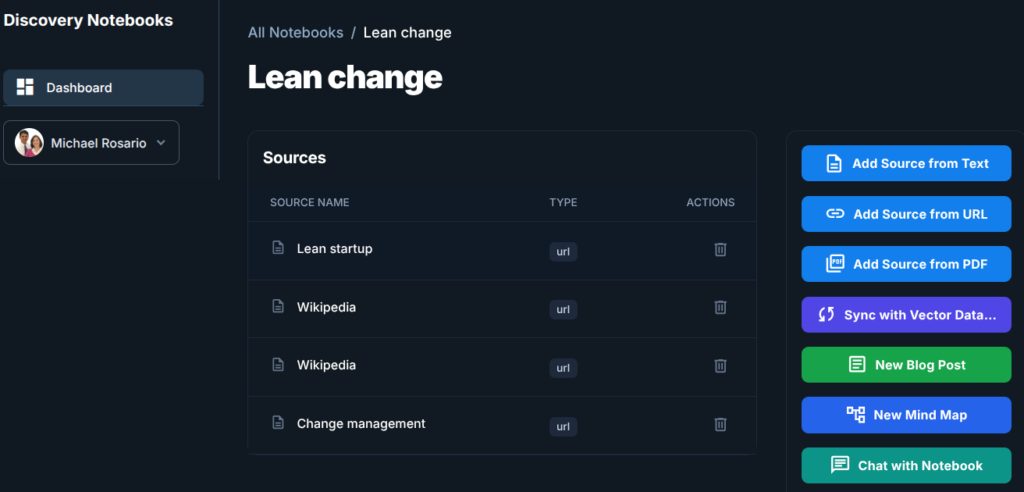
In the first week of Discovery notebooks, I asked Claude to simply create a UI using Bootstrap, js, and HTML. These first of editions of the UI enabled me to explore backend implementations, find bugs, and iterate. I felt a desire to take a more focused approach to direct some of the UI language and application flow. I took Google Stitch for a spin. I felt that Stitch provided me a few concepts and tools to help me refine the look and feel that I really wanted.
Discovery Notebooks is my first Angular project using AI coding. I was really curious how Claude and Gemini would navigate the opinionated nature of Angular. If I’m going to write a large scale application, I still love the Angular approach, components and all the cool refinements they are making with signals. In general, I’ve found the AI coding tools navigate the patterns of Angular really well.
Clean architecture gives us the ability to experiment
By strictly adhering to the Clean Architecture system standard, we isolate our core business rules from external frameworks and UI concerns. This separation creates a pluggable architecture that enables me to switch hit between different databases or third-party services without rewriting the entire application. Because dependencies point inwards, this structure grants us the freedom to experiment with new technologies safely and rapidly. To maintain confidence during these structural changes, I do appreciate having unit tests to check the system health and ensure no regressions occur. Ultimately, this approach ensures that our architecture supports future innovation rather than becoming a source of rigid technical debt.
In Discovery Notebooks, for devs who want to have a local focused approach, you can leverage the ChromaDB vector database implementations. For more robust situations, we can configure the system to connect to a Weaviate as our vector database. I love how low friction this process has become.
How does Discovery Notebooks plan to be different?
How does Discovery Notebooks plan to be different?
While NotebookLM serves as an incredible inspiration and gold standard, Discovery Notebooks aims to carve out its own niche by meeting developers where they live: the terminal. Through deep CLI integration, we allow users to ingest documents, query their notebooks, and run workflows without ever leaving their coding environment. Furthermore, by keeping the project open source, we aren’t just providing a tool; we are providing a blueprint that invites the community to audit, fork, and improve the underlying RAG implementations. Finally, the project’s core mission is to encourage experimentation. By combining this open nature with our pluggable clean architecture, we empower other developers to swap out components, test new vector stores, and truly play with the possibilities of AI-driven research.
I invite you to take Discovery Notebooks for a test drive, whether you explore the live demo or clone the repo to run it locally. This project thrives on community collaboration, so I would genuinely love your feedback on everything from the CLI experience to the architectural choices. Please share your thoughts, bugs, or ideas on GitHub, and let’s learn from these experiments together!
Leave a Reply